
Debit/Credit Wallet
Learn how to use the Debit/Credit Wallet API to adjust user wallet points, manage loyalty rewards, and effectively offer users real-time incentives.
Overview
The Debit/Credit Wallet API allows you to update the points in the user's wallet by either debiting (subtracting) or crediting (adding) them. The wallet ledger balance is updated immediately after the transaction is processed.
This API provides flexibility for a range of scenarios where point adjustments are required, as follows:
- Redeeming Wallet Points in Transactions: Enable users to redeem wallet points during transactions, providing a seamless way to use their loyalty rewards.
- Crediting Points to User Wallets: Add points to user wallets as needed.
This API is essential for businesses managing customer loyalty programs. It allows you to instantly update loyalty balances based on user actions or rewards. For example, if a user earns 100 loyalty points after a purchase, the API instantly credits the points to their wallet. Later, if the user returns the item, the API can debit the corresponding points to ensure the loyalty balance remains accurate.
Example Use Case
Consider an example in which a user makes a $200 purchase and has a balance of 200 points in their wallet. You can use the Debit/Credit Wallet API to redeem wallet points during this transaction as follows:
- Determine Redemption Details: With a conversion rate of 1 point = $1, this redemption translates into a $50 discount.
- Calculate Final Payable Amount: Apply the $50 discount to the purchase amount of $200. The user's final payable amount is $150.
- Invoke the Debit API: Invoke the Debit API to deduct the redeemed points from the user's wallet after completing the transaction successfully. Pass the transaction details such as
walletId,identity, andpointsto be debited (in this case, 50) in the API request. - Update Wallet Ledger: Set the wallet balance to 150 points to ensure the user's wallet accurately reflects the redeemed points.
Example Credit Use CaseThe above example illustrates a scenario specific to the Debit API. Consider an example where the current user balance is 200 points and the user earns 50 points after a transaction. In this case, the Credit API is invoked to add points to the user wallet, updating the wallet balance to 250 points.
Base URL
The following is a sample base URL:
https://<region>.api.clevertap.com/1/promo/creditDebit
For region-specific endpoints, refer to Region.
HTTP Method
POST
Headers
For more information about API headers, refer to Headers.
Query Parameters
The following table lists the required query parameters.
| Parameter | Description | Required/Optional | Type | Example Value |
|---|---|---|---|---|
| identity | Identifies the user associated with the wallet. | Required | string | KMN@123 |
| walletId | Unique identifier assigned to each user wallet within the application. | Required | integer | 1963 |
Body Parameters
The following table lists the body parameters.
| Parameter | Description | Required/Optional | Type | Example Value |
|---|---|---|---|---|
| description | Description of the transaction. | Optional | string | Redemption for order |
| points | Loyalty points value to be debited or credited. Only positive point values are accepted. Requests with negative points are rejected. | Required | numeric | 100 |
| transactionType | Type of transaction. Valid values: DEBIT, CREDIT. | Required | string | DEBIT |
| bucketType | Specifies the bucket where points are credited: ACTIVE or PENDING. This applies only to credit transactions. If not provided, points are credited to the ACTIVE bucket by default. DEBIT transactions are not supported for the PENDING bucket and return error 708 if attempted. | Optional | string | PENDING or ACTIVE |
| activationDuration | Specifies the time duration before points move from the PENDING bucket to the ACTIVE bucket. This parameter is only processed when bucketType is PENDING. It is silently ignored for ACTIVE transactions. The format is space-separated: Xw Xd Xh Xm, where X is the value and w = week, d = day, h = hour, m = minute. For example, 2d 3h means 2 days and 3 hours. | Optional | string | 2d 3h |
| expiryDuration | Specifies the expiry duration for points. Applies to both credit and debit transactions on the ACTIVE bucket. If not provided, the system defaults to the expiry duration configured at the wallet level. The format is space-separated: Xw Xd Xh Xm Xy, where X is the value and w = week, d = day, h = hour, m = minute, y = calendar year. | Optional | string | 1w 2d |
| orderId | References the bill number to associate the transaction with a specific order ID for potential future refunds. This enables tracking transactions for return sales. | Optional | string | ORD12345 |
| saleChannel | The source channel for the transaction (for example, Mobile, Web, or POS). Applies to both credit and debit transactions. | Optional | string | POS |
| locationId | Identifier for the transaction location (for example, a store code). Applies to both credit and debit transactions. | Optional | string | BAN123 |
| saleAmount | Gross order value tied to the transaction. Applies to both credit and debit transactions. | Optional | numeric | 2499.00 |
| metadata | Key-value pairs to persist with the transaction. Applies to both credit and debit transactions. | Optional | object | { "cashierId": "C42", "campaign": "FESTIVE25" } |
Metadata Validation
- You may include any number of key-value pairs.
- Do not send an empty
{}object for metadata. If metadata is present but empty, the API returns a failure with the message "metadata key value can not be empty." Note that error code 777 is a generic error code used for multiple failure conditions and is not specific to metadata validation.- All key-value pairs in metadata are saved with each credit or debit transaction in the wallet transaction store.
Debit Transactions ValidationIf debit transactions exceed available active points, they are not processed to prevent overdrafts in the wallet. DEBIT transactions are not supported for the PENDING bucket and return error 708 if attempted.
Example Request
The following is a sample request to the Debit/Credit Wallet API, showing the headers needed to authenticate the request. The full set of request body options for debit and credit transactions is shown in the payload examples below.
curl -X POST "https://<region>.api.clevertap.com/1/promo/creditDebit?identity=krishna123&walletId=1963" \
-H "X-CleverTap-Account-Id: ACCOUNT_ID" \
-H "X-CleverTap-Passcode: PASSCODE" \
-H "Content-Type: application/json" \
-d '{
  "description": "Reward points for purchase",
  "points": 100,
  "transactionType": "DEBIT",
  "orderId": "order123",
  "saleChannel": "POS",
  "saleAmount": 1000,
  "locationId": "BAN123",
  "metadata": {
    "RuleId": "123",
    "vouchercode": "oomco123",
    "brand": "amazon"
  }
}'
Find CleverTap Account ID and Passcode
You can find the CleverTap Account ID and Passcode from the CleverTap dashboard by navigating to Settings > Project.
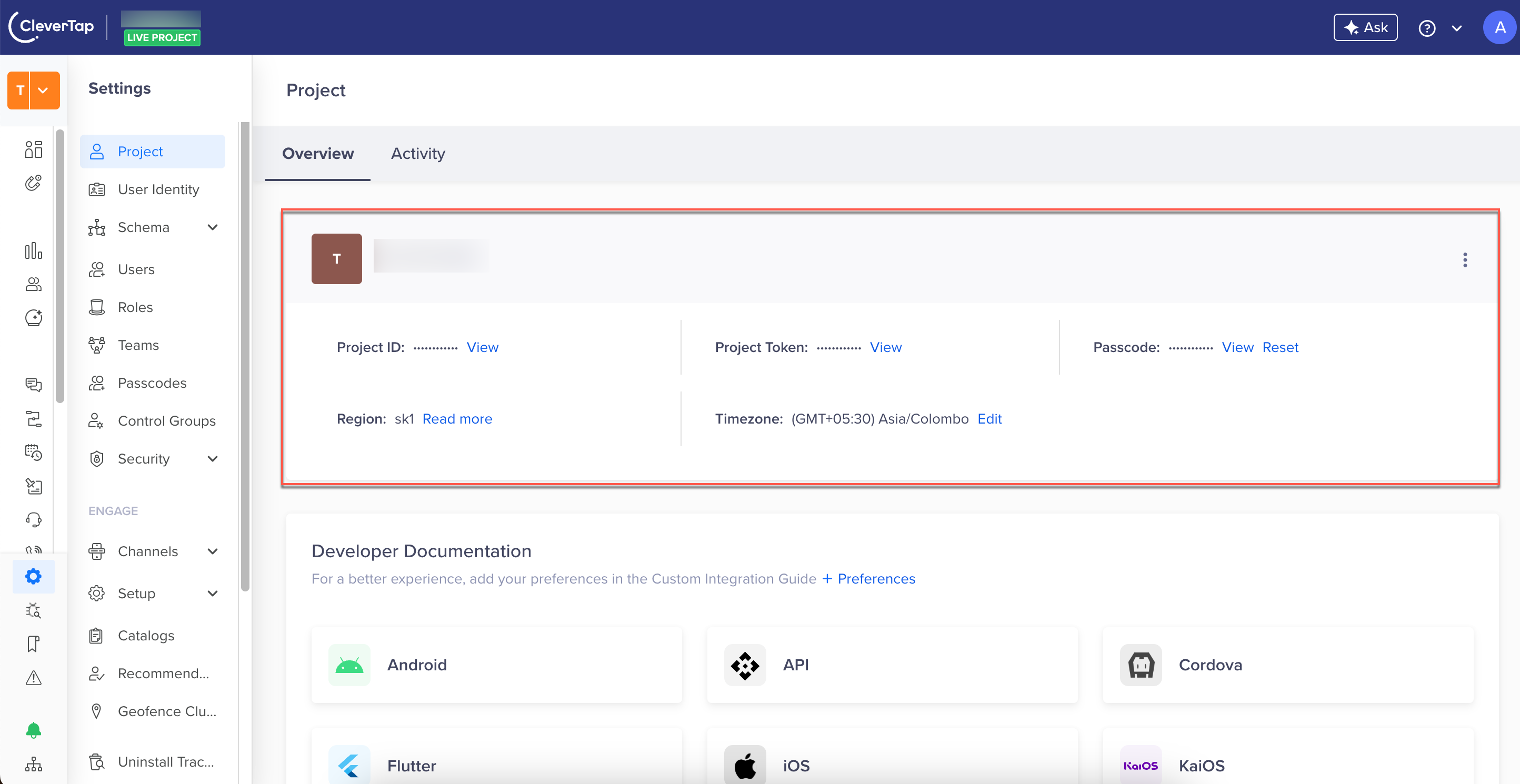
Find CleverTap Project Details
The following are the request payload examples for debit and credit transactions.
{
  "description": "Reward points for purchase",
  "points": 100,
  "transactionType": "DEBIT",
  "orderId": "order123",
  "saleChannel": "POS",
  "saleAmount": 1000,
  "locationId": "BAN123",
  "metadata": {
    "RuleId": "123",
    "vouchercode": "oomco123",
    "brand": "amazon"
  }
}
{
"description": "Reward points for purchase",
"points": 100,
"transactionType": "CREDIT",
"bucketType": "ACTIVE",
"expiryDuration": "1d 10m",
"orderId": "order123",
"saleChannel": "POS",
"saleAmount": 1000,
"locationId": "BAN123",
"metadata": {
"RuleId": "123",
"vouchercode": "oomco123",
"brand": "amazon"
}
}{
"description": "Reward points for purchase",
"points": 100,
"transactionType": "CREDIT",
"bucketType": "PENDING",
"activationDuration": "3d",
"expiryDuration": "1d 10m",
"orderId": "order123",
"saleChannel": "POS",
"saleAmount": 1000,
"locationId": "BAN123",
"metadata": {
"RuleId": "123",
"vouchercode": "oomco123",
"brand": "amazon"
}
}Example Response
The following is a sample response. On a successful API call, the system debits or credits the specified points from the user's wallet and returns the updated wallet balance and transaction details.
{
  "status": "success",
  "record": {
    "saleAmount": 1000,
    "walletId": 1963,
    "metadata": {
      "RuleId": "123",
      "brand": "amazon",
      "vouchercode": "oomco123"
    },
    "activePoints": 120.46,
    "orderId": "order123",
    "saleChannel": "POS",
    "locationId": "BAN123",
    "description": "Reward points for purchase",
    "tnxId": "wl_EjKlltmdYqrJYDiRaRcGv",
    "points": 100
  }
}
NoteThe
saleChannel,locationId,saleAmount, andmetadatafields are echoed back in the response when provided in the request. ThetnxIdfield is the transaction ID assigned to this wallet transaction. Note that this field uses the non-standard spellingtnxIdrather thantxnId; this matches the API's actual response and is not a typo.
Errors
To know the errors applicable to the Debit/Credit Wallet API, refer to API Error Cases.
Updated 3 months ago