
Get Wallet Details
Learn how to use the Get Wallet Details API to access user wallet information.
Overview
The Get Wallet Details API fetches user wallet information, including the wallet balance, active points, and pending or expired points. This API can be integrated at key touchpoints to provide seamless access to wallet data within your application's user interface.
This API provides the following two key components:
- Wallet Definition: Provides the following essential wallet configuration details necessary for accurate wallet identification and display within your application:
- Wallet Name
- Loyalty Points Name
- Wallet ID
- Wallet Ledger Balance: Provides a detailed breakdown of the user's wallet activity for display within the application user interface, as follows:
- Active Points
- Promised Points
- Credited Points
- Expired Points
- Redeemed Points
Using these insights, you can present an up-to-date, transparent view of the user's wallet activity in your application.
Base URL
The following is a sample base URL:
https://<region>.api.clevertap.com/1/promo/wallets
For region-specific endpoints, refer to Region.
HTTP Method
GET
Headers
For more information about API headers, refer to Headers.
Query Parameters
Provide exactly one of the following parameters to identify the user. The API resolves them in this priority order: if objectId is present, it is used first, then email identity. If none of the three resolve to a valid user, the API returns HTTP 400 "Invalid identity".
The following table lists the accepted query parameters:
| Parameter | Description | Type | Example Value | Required/Optional |
|---|---|---|---|---|
| objectId | The CleverTap-generated GUID for the user. Takes priority over email and identity if provided. | string | 37b08803c1af4e10849f530264bac7f8 | Optional (one of the three is required) |
The user's email address. Used if email is configured as an identity field for the account. Takes priority over identity if provided. | string | [email protected] | Optional (one of the three is required) | |
| identity | The custom identity string assigned to the user. | string | KMN@123 | Optional (one of the three is required) |
Example Request
The following is a sample request to the Get Wallet Details API, showing the headers needed to authenticate the request.
curl -X GET "https://<region>.api.clevertap.com/1/promo/wallets?identity=krishna123" \
-H "X-CleverTap-Account-Id: ACCOUNT_ID" \
-H "X-CleverTap-Passcode: PASSCODE" \
-H "Content-Type: application/json"
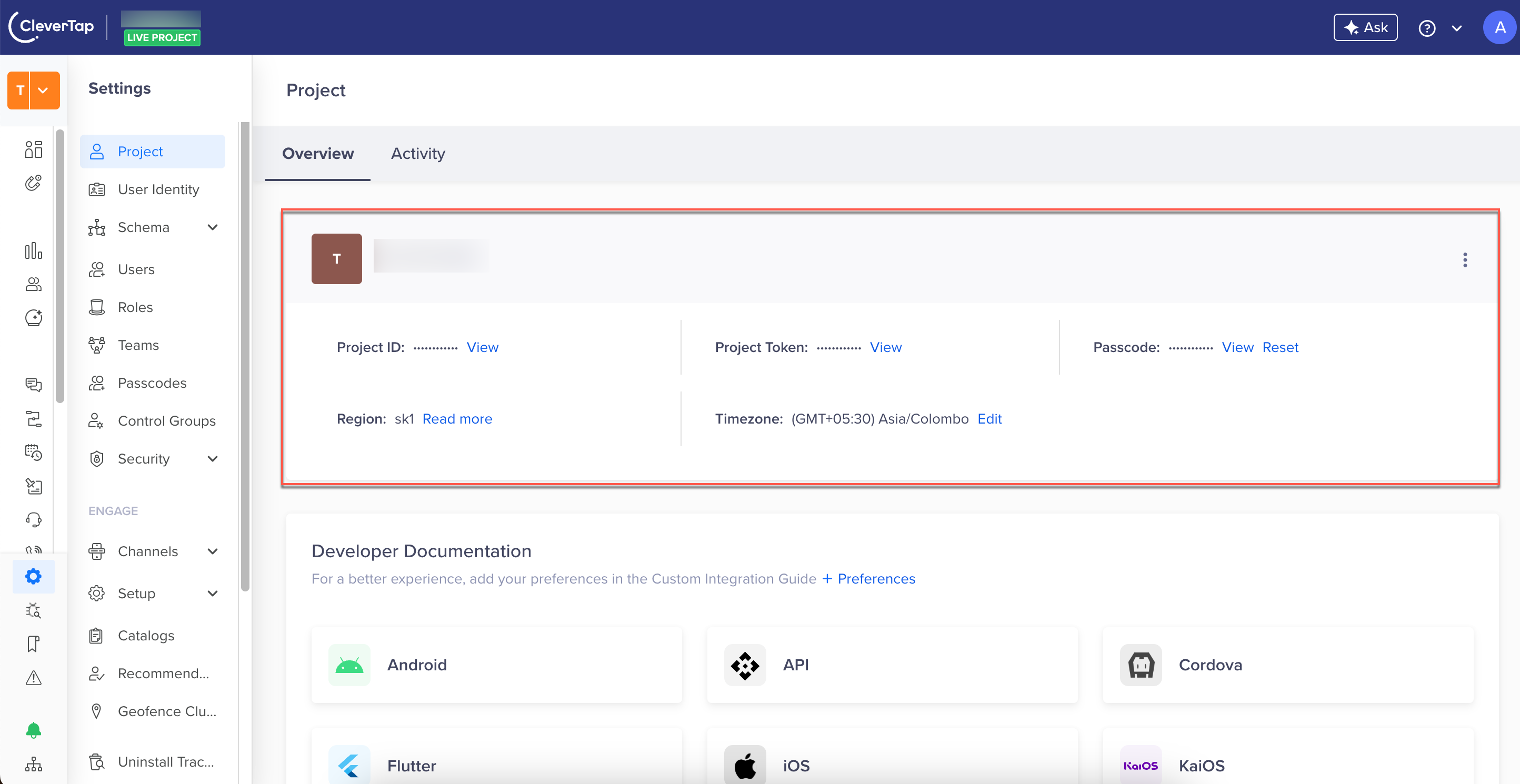
Find CleverTap Account ID and Passcode
You can find the CleverTap Account ID and Passcode from the CleverTap dashboard by navigating to Settings > Project.
Example Response
The following is a sample response. A successful request returns an array of wallet objects.
{
    "status": "success",
    "records": [
        {
            "walletId": 1000,
            "totalRedeemedPoints": 0,
            "totalCreditedPoints": 0,
            "activePoints": 0,
            "walletName": "CleverTap Wallet",
            "totalPromisedPoints": 0,
            "loyaltyPointsName": "Points",
            "expiredPoints": 0
        },
        {
            "walletId": 1003,
            "totalRedeemedPoints": 0,
            "totalCreditedPoints": 0,
            "activePoints": 0,
            "walletName": "Promo Wallet",
            "totalPromisedPoints": 0,
            "loyaltyPointsName": "Promo Coins",
            "expiredPoints": 0
        },
        {
            "walletId": 1020,
            "totalRedeemedPoints": 129,
            "totalCreditedPoints": 388.579,
            "activePoints": 0,
            "walletName": "test",
            "totalPromisedPoints": 129.526,
            "loyaltyPointsName": "Offer",
            "expiredPoints": 259.053
        }
    ]
}
The following table describes the response fields. The response may include additional fields not listed here, depending on the wallet configuration.
| Field | Description | Type | Example Value |
|---|---|---|---|
| walletId | Unique wallet ID assigned by CleverTap for a specific wallet created on your CleverTap dashboard. | integer | 1000 |
| walletName | Name of the wallet. | string | "Super wallet" |
| loyaltyPointsName | Name of the currency associated with the wallet. | string | "Coin" |
| totalRedeemedPoints | Total points redeemed from the user wallet via the Debit Wallet API and the CleverTap dashboard. | float | 20 |
| totalCreditedPoints | Total points rewarded to the user from all sources. | float | 388.579 |
| activePoints | Current active wallet points held by the user. | float | 40 |
| totalPromisedPoints | Total points rewarded to a user but not yet credited to the user's wallet. | float | 129.526 |
| expiredPoints | Total number of unused points expired in the user's wallet. | float | 259.053 |
Error Codes
The following table lists the error codes returned by this API:
| HTTP Status | Error | Description | Example Error Response |
|---|---|---|---|
| 400 | "Invalid identity" | identity, email, and objectId are all missing, or none resolve to a valid user | {"status":"fail","error":"Invalid identity","code":400} |
| 401 | "Invalid credentials" | Wrong or missing passcode | {"status":"fail","error":"Invalid credentials","code":401} |
| 500 | "Request couldn't be processed due to a system error. Try again." | Promo backend returned an error | {"status":"fail","error":"Request couldn't be processed due to a system error. Try again.","code":500} |
| 503 | — | Promo backend not responding. Retry with backoff. | {"status":"fail","error":"...","code":503} |
Updated 3 months ago