
Redeem/Revert
Learn how to use the Redeem/Revert Coupon API to update the coupon code status, ensuring accurate application and reversals during transactions.
Overview
The Redeem/Revert Coupon API allows you to manage coupon code redemption and reversal during transactions. This API ensures accurate tracking of coupon usage by updating its status based on the transaction outcome, whether successful or canceled.
You can integrate this API at critical touchpoints such as payment processing or order cancellation flows. Upon execution, CleverTap processes the coupon redemption or reversal request and returns a response indicating the updated status of the coupon code for the specified user.
You can use this API in the following cases:
- A user completes a transaction, and the coupon code needs to be redeemed.
- A user cancels an order, and the redeemed coupon needs to be reverted to be used again.
- Payment failure after the coupon code is redeemed.
- Any other custom checkpoints in the user journey that require coupon redemption or reversal during transaction management.
Base URL
The following is a sample base URL:
https://<region>.api.clevertap.com/1/promo/coupons/apply
For region-specific endpoints, refer to Region.
HTTP Method
POST
Headers
For more information about API headers, refer to Headers.
Query Parameters
The following table lists the query parameters.
| Parameter | Description | Required/Optional | Type | Example Value |
|---|---|---|---|---|
| identity | Unique identifier for the user. Mandatory for campaign user coupon validation to determine the source of the coupon issued. If not provided, the API returns the error "identity is required". | Required | string | user0123 |
| type | Specifies the action to be taken. Use redeem to apply a coupon or revert to cancel a redeemed coupon. If missing or invalid, the API returns an error indicating the type must be either redeem or revert. | Required | string | redeem or revert |
Body Parameters
The body parameters define the structure and data required to redeem or revert a coupon. The request body accepts couponCode and couponId as top-level fields alongside the order object. The items array is nested inside the order object.
Top-Level Body Parameters
The following table lists the top-level body parameters.
| Parameter | Description | Required/Optional | Type | Example Value |
|---|---|---|---|---|
| couponCode | Unique coupon code to redeem or revert. Always required regardless of coupon type. | Required | string | DIWALI100 |
| couponId | Coupon ID generated against the coupon code. Required whentype=revert; not applicable for type=redeem. | Required for type=revert | integer | 1695 |
| order | Object containing order and item details. See the order Object section below. | Required | object | — |
Coupon Code Handling
couponCodeis always required for both fixed code and bulk code coupons. For bulk code coupons, thecouponCodemust match the specific code assigned to the user.
order Object
order ObjectThe order object provides information about the overall order. If the order object is not included, the API cannot process the request, as coupon applicability and calculations depend on these order details.
The following table lists the order object parameters.
| Parameter | Description | Required/Optional | Type | Example Value |
|---|---|---|---|---|
| orderId | Unique identifier for the order being placed. | Required | string | abcd12345 |
| saleMrpTotal | Sum of the original price of all items, calculated as MRP × quantity. | Optional | numeric | 500 |
| saleAmount | Sum of the selling price of all items, calculated as unitPrice × quantity. | Required for type=redeem | numeric | 300 |
| saleChannel | Source through which the sale is made. | Optional | string | online |
| location | Location where the sale is made. | Optional | string | India |
| locationId | Unique ID assigned to the location. | Optional | string | IND |
| orderShipping | Shipping charges for the order. | Optional | numeric | 30 |
| orderStatus | Status of the transaction: pending (initiated but not completed), completed (successfully completed), or reverted (rolled back). | Required for type=redeem | string | pending |
| paymentMode | Mode of payment used for the transaction (for example, credit_card, debit_card, net_banking). | Optional | string | credit_card |
| cartQuantity | Total quantity of items in the cart. | Optional | numeric | 4 |
| items | Array of item objects nested inside order. See the items Array section below. | Required | array of objects | — |
| metadata | Custom key-value pairs for advanced coupon validations at the order level. | Optional | object | {"customerType": "guests"} |
items Array (nested inside order)
items Array (nested inside order)The items array is nested inside the order object and provides details about individual items in the cart.
The following table lists the items object parameters.
| Parameter | Description | Required/Optional | Type | Example Value |
|---|---|---|---|---|
| productId | Unique identifier for the product in your application. | Required | string | abc_124 |
| sku | Stock Keeping Unit (SKU) assigned to the product. | Optional | string | 124 |
| itemName | Name of the product. | Optional | string | Cotton Shirt |
| category | Category of the product. | Optional | string | shirts |
| subCategory | Subcategory of the product. | Optional | string | cotton shirts |
| brand | Brand of the product. | Optional | string | superdry |
| unitPrice | Selling price of the product. | Required | numeric | 80 |
| mrp | Original MRP of the product. | Optional | numeric | 700 |
| quantity | Quantity of the product in the cart. | Optional | integer | 12 |
| metadata | Custom key-value pairs for advanced item-level coupon validations. | Optional | object | {"color": "blue"} |
metadata Object
metadata ObjectThe metadata object allows you to include additional custom key-value pairs for advanced coupon validations. It can be passed within both the order and items objects.
The following table lists the metadata object parameters.
| Parameter | Description | Required/Optional | Type | Example Value |
|---|---|---|---|---|
| key | Metadata property name (for example, color, size, supplier). | Optional | string | size |
| value | Metadata property value (for example, Red, Large, Supplier A). | Optional | string | large |
Example Request
The following are sample requests to the Redeem/Revert Coupon API, showing the headers needed to authenticate the request.
curl -X POST "https://<region>.api.clevertap.com/1/promo/coupons/apply?identity=krishna123&type=redeem" \
-H "X-CleverTap-Account-Id: ACCOUNT_ID" \
-H "X-CleverTap-Passcode: PASSCODE" \
-H "Content-Type: application/json" \
-d '{
    "couponCode": "SALE100",
    "order": {
        "orderId": "order123349",
        "saleMrpTotal": 399,
        "saleAmount": 101,
        "saleChannel": "online",
        "location": "BLR",
        "locationId": "IND",
        "orderStatus": "pending",
        "items": [
            {
                "productId": "123456",
                "sku": "124",
                "itemName": "Cotton Shirt",
                "category": "shirts",
                "subCategory": "cotton shirts",
                "brand": "superdry",
                "unitPrice": 300,
                "mrp": 300,
                "quantity": 3,
                "metadata": {
                    "color": "blue"
                }
            },
            {
                "productId": "123457",
                "sku": "125",
                "itemName": "Chino Trouser",
                "category": "trousers",
                "subCategory": "",
                "brand": "levis",
                "unitPrice": 100,
                "mrp": 100,
                "quantity": 1,
                "metadata": {
                    "color": "khaki"
                }
            }
        ],
        "metadata": {
            "customerType": "guests"
        }
    }
}'
curl -X POST "https://<region>.api.clevertap.com/1/promo/coupons/apply?identity=krishna123&type=revert" \
-H "X-CleverTap-Account-Id: ACCOUNT_ID" \
-H "X-CleverTap-Passcode: PASSCODE" \
-H "Content-Type: application/json" \
-d '{
"couponCode": "SALE100",
"couponId": 1695,
"order": {
"orderId": "order123349",
"saleMrpTotal": 399,
"saleAmount": 101,
"saleChannel": "online",
"location": "BLR",
"locationId": "IND",
"orderStatus": "reverted",
"items": [
{
"productId": "123456",
"sku": "124",
"itemName": "Cotton Shirt",
"category": "shirts",
"subCategory": "cotton shirts",
"brand": "superdry",
"unitPrice": 300,
"mrp": 300,
"quantity": 3,
"metadata": {
"color": "blue"
}
},
{
"productId": "123457",
"sku": "125",
"itemName": "Chino Trouser",
"category": "trousers",
"subCategory": "",
"brand": "levis",
"unitPrice": 100,
"mrp": 100,
"quantity": 1,
"metadata": {
"color": "khaki"
}
}
],
"metadata": {
"customerType": "guests"
}
}
}'Find CleverTap Account ID and Passcode
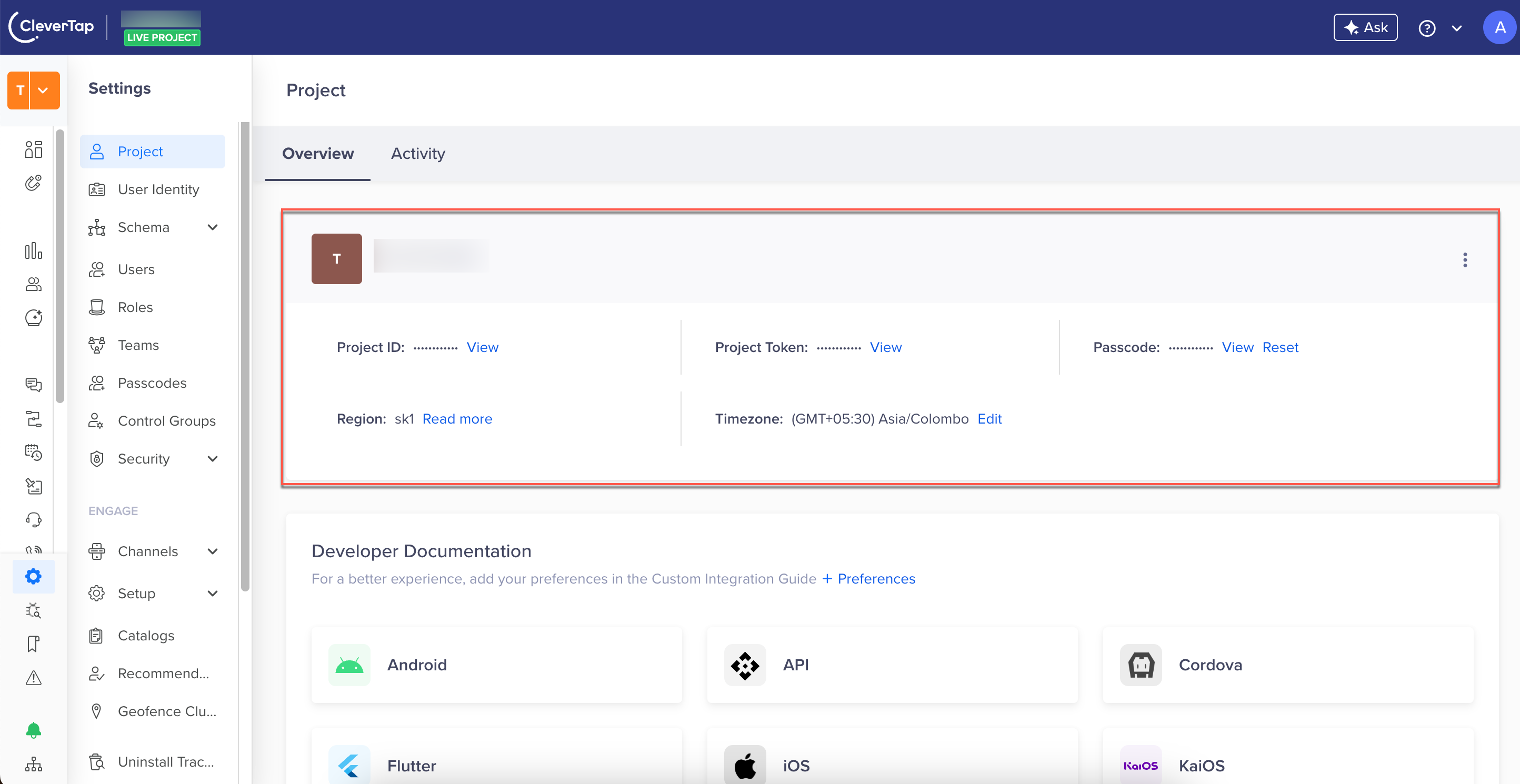
You can find the CleverTap Account ID and Passcode from the CleverTap dashboard by navigating to Settings > Project.
Example Response
The following are sample responses for redeem and revert requests.
{
    "status": "success",
    "records": [
        {
            "couponTimeframe": [
                {
                    "timeSlot": {
                        "startTime": "00:00AM",
                        "endTime": "11:59PM"
                    },
                    "validationDay": "All"
                }
            ],
            "couponName": "SALE100",
            "couponExpiry": 32494151843,
            "couponCodeId": 2255,
            "totalRedemptionUnlimited": true,
            "isApplicable": true,
            "description": "",
            "message": "",
            "couponExpiryNever": true,
            "termsAndConditions": [],
            "discountEffect": {
                "discountRate": 99,
                "rewardType": "cashback",
                "discountType": "entireOrder",
                "discountAppliedOn": "saleAmount",
                "discountValue": "absolute"
            },
            "totalRedemptionLeft": 0,
            "couponSavings": {
                "customPropertyDiscount": null,
                "orderDiscount": 0,
                "shippingDiscount": 0,
                "orderCashbackPoints": 0,
                "order": {
                    "saleAmount": 2300,
                    "metadata": {
                        "customerType": "premium",
                        "transactionId": "UPI123456789"
                    },
                    "saleMrpTotal": 2500,
                    "orderId": "order123349",
                    "orderStatus": "pending",
                    "itemsTotalQuantity": 0,
                    "itemsMrpTotal": 0,
                    "saleChannel": "online",
                    "orderShipping": 100,
                    "locationId": "IND",
                    "location": "BLR",
                    "items": [],
                    "orderNetAmount": 2300,
                    "itemsSaleAmount": 0
                }
            },
            "bestCoupon": "",
            "identity": "j10393",
            "requestId": "",
            "redemptionActivationDate": 1756405800,
            "userRedemptionUnlimited": false,
            "redemptionStatus": true,
            "couponCode": "SALE100",
            "userRedemptionLeft": 1
        }
    ]
}
{
"status": "success",
"records": [
{
"couponTimeframe": null,
"couponName": "",
"couponExpiry": 0,
"couponCodeId": 2255,
"totalRedemptionUnlimited": false,
"isApplicable": false,
"description": "",
"message": "",
"couponExpiryNever": false,
"termsAndConditions": null,
"discountEffect": {
"discountRate": 0,
"rewardType": "cashback",
"discountType": "",
"discountAppliedOn": "",
"discountValue": ""
},
"totalRedemptionLeft": 0,
"couponSavings": {
"customPropertyDiscount": null,
"orderDiscount": 0,
"shippingDiscount": 0,
"orderCashbackPoints": 0,
"order": {
"saleAmount": 0,
"metadata": null,
"saleMrpTotal": 0,
"orderId": "order123349",
"orderStatus": "",
"itemsTotalQuantity": 0,
"itemsMrpTotal": 0,
"saleChannel": "",
"orderShipping": 0,
"locationId": "",
"location": "",
"items": null,
"orderNetAmount": 0,
"itemsSaleAmount": 0
}
},
"bestCoupon": "",
"identity": "j10393",
"requestId": "",
"redemptionActivationDate": 0,
"userRedemptionUnlimited": false,
"redemptionStatus": false,
"couponCode": "SALE100",
"userRedemptionLeft": 0
}
]
}The response structure is the same as the Fetch Coupon API response. The following differences apply for this endpoint:
- The
identityfield in the response returns CleverTap's internal J-ID (for example,j10393), which is the internal numeric user ID resolved from the caller's input identity. This is not the same as theidentityvalue passed in the query parameter. Do not compare the response identity against your input value. - The
bestCouponfield returns an empty string ("") in both redeem and revert responses. Best-coupon ranking is not computed for this endpoint.
Understanding API Response
The Redeem/Revert Coupon API shares several behavior points with the Validate Coupon API. Refer to the Validate Coupon API Behavior section for applicable rules, including:
- Identity validation
- Order and Item Object validation
- Optional parameters validation
- Metadata validation
- Coupon code or coupon ID validation
- Day-specific coupon availability
- Case sensitivity of coupon codes
The following are additional behaviors specific to the Redeem/Revert API.
| Scenario | Behavior |
|---|---|
| Coupon redeemed for non-logged-in users | The API returns an error message, as coupons cannot be redeemed by non-logged-in users. |
| Coupon redemption against duplicate order ID | The API returns an error message if a coupon is redeemed against the same order ID as a normal coupon. |
| Reverting a coupon with a mismatched order ID | The API returns an error message if a coupon is reverted without matching the original redeemed order ID. |
Stacking normal and customProperty coupons | Users can redeem one normal coupon (applying discounts to predefined cart conditions such as entireOrder, cartExcluding, or selectedItems) with multiple customProperty coupons (applying discounts based on custom attributes) against the same order ID. |
| Stacking normal coupons | Users cannot redeem the same or different normal coupons multiple times against the same order ID. |
Stacking customProperty coupons | Users cannot redeem the same customProperty coupon multiple times against the same order ID. |
| Duplicate order IDs | The API validates duplicate order IDs based on the combination of coupon type and order ID. |
Errors
To know about the errors applicable to the Redeem/Revert Coupon API, refer to API Error Cases.
Updated 3 months ago