
Get Wallet Transactions
Learn how to use Get Wallet Transactions API to retrieve detailed user wallet transaction logs for efficient wallet management.
Overview
The Get Wallet Transactions API helps you retrieve wallet transaction details for a specific user. You can integrate this API at relevant touchpoints within your application to display transaction details on the user interface.
This API provides the following information:
- Transaction History: Includes a comprehensive log of all wallet transactions, that is, credits, debits, and expirations processed through various sources linked to the user's wallet.
- Promised Points: Displays points that have yet to be credited to the user's wallet, based on their activation date. This allows users to monitor points scheduled for future credit. For example, if a user earns 100 points for a transaction with a 7-day activation period, these points remain in the Pending bucket until the activation period ends. After 7 days, they move to Active status and become redeemable.
- Expiring Points: Displays points nearing expiration along with their expiry dates, helping users track and redeem them before they expire to avoid losing benefits.
- System Keys and Metadata: Includes additional system keys such as
saleChannel,locationId,saleAmount, andorderId. A metadata object with key-value pairs is also returned, reflecting any data provided when the debit or credit transaction was created. If no metadata was associated, the field is returned as null.
Base URL
The following is a sample base URL:
https://<region>.api.clevertap.com/1/promo/transactions
For region-specific endpoints, refer to Region.
HTTP Method
GET
Headers
For more information about API headers, refer to Headers.
Query Parameters
The following table lists the accepted query parameters:
| Parameter | Description | Type | Required/Optional | Example Value |
|---|---|---|---|---|
| identity | Identifies the user associated with the wallet. | string | Required | KMN@123 |
| walletId | Unique identifier assigned to each user wallet. The value is a string, though wallet IDs are typically numeric. | string | Required | "2163" |
| page | Page number for paginated results. The default value is 1. Each page returns up to 25 transactions. | integer | Optional | 1 |
| type | The type of transaction to retrieve. Accepted values: credit, debit, expired, reverse, refund. If not specified, the API returns transactions of all types. Values are case-insensitive. Multiple comma-separated values are accepted, for example, type=credit,debit. | string | Optional | credit,debit |
| txnSource | The source through which the wallet transaction occurred. Accepted values: api, system, campaign, manual, cashbackcoupon. If not specified, the API returns transactions from all sources. Values are case-insensitive. Only one value is supported per request. | string | Optional | campaign |
| saleChannel | The sales channel recorded against credit and debit transactions. Pass the value exactly as it was recorded. This filter is case-sensitive. For example, POS and pos are treated as different values. Spaces and special characters are accepted. Only one value is supported per request. | string | Optional | star-pos |
| campaignId | The numeric ID of a CleverTap promo campaign. Pass this parameter to retrieve transactions associated with a specific campaign. Only one value is supported per request. | integer | Optional | 456 |
| orderId | The order ID is recorded against credit and debit transactions. Only one value is supported per request. | string | Optional | ORD-98123 |
| locationId | The location ID recorded against credit and debit transactions. Only one value is supported per request. | string | Optional | BAN-MG-ROAD |
| from | Filters transactions with a timestamp on or after this value. Pass the timestamp in UTC epoch format (seconds). If to is not provided, the API defaults the end time to the current timestamp. The boundary is inclusive. | integer | Optional | 1704067200 |
| to | Filters transactions with a timestamp on or before this value. Pass the timestamp in UTC epoch format (seconds). Must be used together with from. The boundary is inclusive. | integer | Optional | 1706745600 |
Note
- All filter parameters are optional. Filters not passed, or passed with blank or null values, are silently ignored.
- Filters only apply to the
allTransactionsarray in the response. ThepromisedPointsandpointsExpiringobjects are not affected and always return their full data.- When no transactions match the applied filters, the
allTransactionsarray returns empty. This is not an error.- All filter keys work together with AND logic by default.
Filter Behavior
The following rules apply when using query parameters to filter wallet transactions.
| Scenario | Behavior |
|---|---|
| Multiple filter keys use AND logic | When you pass multiple filter keys, the API returns only transactions that match all conditions. For example, type=credit&txnSource=campaign returns only credit transactions that originated from a promo campaign. |
type supports multiple comma-separated values | You can pass more than one value for type in a single request. For example, type=credit,debit returns both credit and debit transactions. |
| All other filter keys support only one value | Passing multiple values for orderId, saleChannel, txnSource, campaignId, or locationId returns an error. |
type and txnSource are case-insensitive | credit and CREDIT are treated as the same. campaign and CAMPAIGN are treated as the same. |
saleChannel is case-sensitive | POS and pos are treated as different values. Pass the value exactly as it was recorded at the time of the transaction. |
| Blank or null filter values are silently ignored | If a filter key is passed with no value, it does not affect the results. |
Filters apply only to allTransactions | The promisedPoints and pointsExpiring objects in the response are not affected by any filter. They always return their full data, regardless of the filters applied. |
Date Range Behavior
The from and to parameters let you filter transactions to a specific time window. Both values must be passed in UTC epoch format (seconds). The following rules define how the API handles different date range inputs.
| Scenario | Behavior |
|---|---|
Both from and to provided | Returns transactions where from ≤ txnTimestamp ≤ to. Both boundaries are inclusive. |
Only from provided, to omitted | The API automatically uses the current timestamp as to. Returns all transactions from the given start time up to now. |
Only to provided, from omitted | Returns a to requires from error. to cannot be used without from. |
from is later than to | Returns an Invalid date range error. |
| Date passed as a formatted string instead of an epoch | Returns an Invalid date format, expected in epoch error. |
| Invalid or non-numeric epoch value | Returns an Invalid date format error. |
For full-day filtering, pass from as 00:00:00 UTC and to as 23:59:59 UTC for the target date, converted to epoch. For example, to filter all transactions on January 1, 2024 (UTC), pass from=1704067200&to=1704153599.
Example Request
The following is a sample request to the Get Wallet Transactions API, showing the headers needed to authenticate the request.
curl -X GET "https://<region>.api.clevertap.com/1/promo/transactions?identity=krishna123&walletId=2163" \
-H "X-CleverTap-Account-Id: ACCOUNT_ID" \
-H "X-CleverTap-Passcode: PASSCODE" \
-H "Content-Type: application/json"
curl -X GET "https://<region>.api.clevertap.com/1/promo/transactions?identity=krishna123&walletId=2163&type=credit,debit&txnSource=campaign&campaignId=456&from=1704067200&to=1706745600" \
-H "X-CleverTap-Account-Id: ACCOUNT_ID" \
-H "X-CleverTap-Passcode: PASSCODE" \
-H "Content-Type: application/json"Find CleverTap Account ID and Passcode
You can find the CleverTap Account ID and Passcode from the CleverTap dashboard by navigating to Settings > Project.
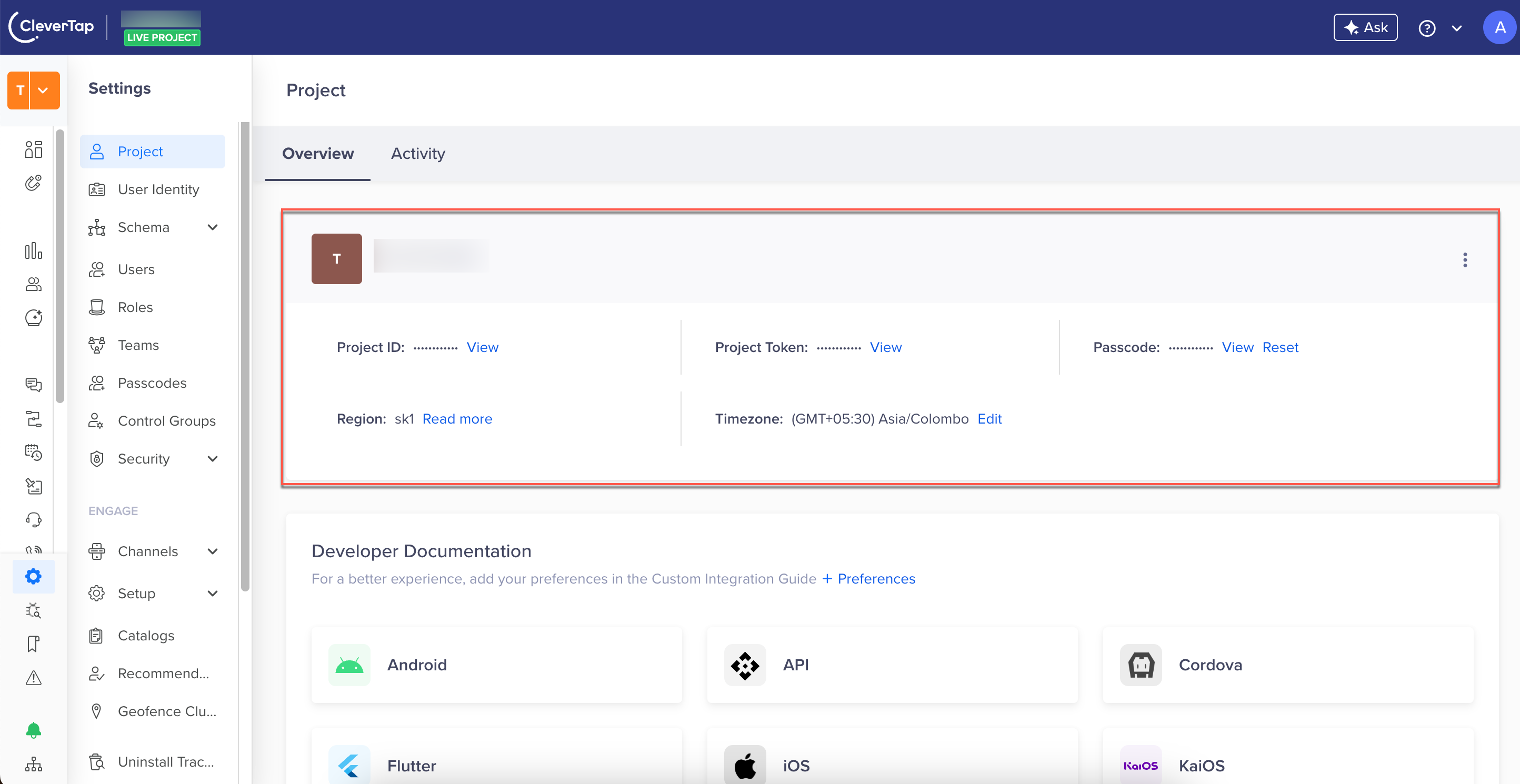
Find CleverTap Project Details
Example Response
The following is a sample response. The API returns an array of objects, with each object containing details about a specific transaction for the given walletId.
{
  "status": "success",
  "record": {
    "allTransactions": [
      {
        "txnTimestamp": 1754386499,
        "saleAmount": 0,
        "metadata": null,
        "orderId": "",
        "saleChannel": "",
        "campaignId": 1754386284,
        "locationId": "",
        "txnSource": "SYSTEM",
        "description": "Points expired automatically by system",
        "type": "EXPIRED",
        "tnxId": "wl_wB3FNMnD0ea0QD0xwfg1W",
        "points": 259.9
      },
      {
        "txnTimestamp": 1754384850,
        "saleAmount": 1000,
        "metadata": {
          "Key1": "Test1",
          "key2": "Test2"
        },
        "orderId": "order123",
        "saleChannel": "UPI",
        "campaignId": 0,
        "locationId": "BAN123",
        "txnSource": "API",
        "description": "Reward points for purchase",
        "type": "CREDIT",
        "tnxId": "wl_71ezcyzGWLc0S19qeCUo1",
        "points": 77
      }
    ],
    "pagination": {
      "currentPage": 1,
      "pageSize": 25,
      "totalPages": 10,
      "totalRecords": 248,
      "hasNext": true
    },
    "promisedPoints": {
      "totalPromisedPoints": 0,
      "promisedPointsList": []
    },
    "pointsExpiring": {
      "earliestExpiryTimestamp": 1754471850,
      "pointsExpiringSoon": 77,
      "pointsExpiringList": [
        {
          "expiryTimestamp": 1754471850,
          "points": 77
        },
        {
          "expiryTimestamp": 1754472109,
          "points": 7.7
        }
      ]
    }
  }
}
Note
- The parameters
type,txnSource,saleChannel,campaignId,orderId, andlocationIdin eachallTransactionsentry correspond directly to the optional query parameters you can use to filter results.- The
fromandtoquery parameters filter based on thetxnTimestampfield.- The
promisedPointsandpointsExpiringobjects are not affected by any filters applied.
The sections below provide a detailed breakdown of the response payload.
allTransactions Array
allTransactions ArrayThe allTransactions array returns the complete transaction history of the wallet, including credits, debits, expired, and pending transactions. Each transaction entry provides details such as the transaction source, type, description, timestamp, and points involved.
The following table describes the fields in each allTransactions entry.
| Parameter | Description | Type | Example Value |
|---|---|---|---|
| txnTimestamp | Unix timestamp (UTC epoch, in seconds) when the transaction was created. | integer | 1754386499 |
| saleAmount | Total order amount associated with the transaction. For example, if a customer makes a purchase worth 2,499, this field reflects that value. Applies to both credit and debit transactions. | numeric | 2499 |
| metadata | Key-value pairs persisted with the transaction. Applies to both credit and debit transactions. Returns null if no metadata was provided. | object | { "cashierId": "C42", "campaign": "FESTIVE25" } |
| orderId | References the bill number to associate the transaction with a specific order ID for potential future refunds. This enables tracking transactions for return sales. | string | ORD12345 |
| saleChannel | The source channel for the transaction (for example, Mobile, Web, POS). Applies to both credit and debit transactions created via API. | string | POS |
| locationId | Identifier for the transaction location (for example, a store code). Applies to both credit and debit transactions created via API. | string | BAN123 |
| txnSource | Source of the wallet transaction. Possible values: CAMPAIGN, API, MANUAL, SYSTEM. | string | CAMPAIGN, API, MANUAL, SYSTEM |
| campaignId | The numeric ID of the CleverTap promo campaign associated with the transaction. Returns 0 for transactions not linked to a campaign. | integer | 1754386284 |
| description | Description of the wallet transaction. | string | Points debited for late payment |
| type | Wallet transaction type indicating the transaction's nature. Possible values: CREDIT (points added), DEBIT (points deducted), EXPIRED (points that reached expiry), PENDING (points awaiting activation), REVERSE (reversed transaction), REFUND (refunded transaction). | string | CREDIT, DEBIT, EXPIRED, PENDING, REVERSE, REFUND |
| tnxId | Transaction ID assigned to the wallet transaction. | string | wl_MRCJSqtH9akcvzvK |
| points | Wallet points that are debited or credited against each transaction. | numeric | 20 |
NoteFor transactions created through the Debit/Credit API, the system keys
saleChannel,locationId,saleAmount, and anymetadataprovided are returned in the response. For expired or system-generated transactions, these keys may not apply and can appear as empty strings (""),0, ornull.
pagination Object
pagination ObjectThe pagination object is returned alongside the allTransactions array and provides details about the total volume of matching records and your current position within the paginated results. Use this object to build pagination controls in your platform's user interface, for example, displaying "Page 2 of 10" or enabling a Next Page button.
The following table describes the pagination fields.
| Parameter | Description | Type | Example Value |
|---|---|---|---|
| currentPage | The page number of the current response. Corresponds to the page query parameter passed in the request. | integer | 1 |
| pageSize | The number of records returned in the current page. The maximum is 25 records per page. | integer | 25 |
| totalPages | The total number of pages available for the current filter combination. | integer | 10 |
| totalRecords | The total number of transactions matching the applied filters across all pages. | integer | 248 |
| hasNext | Indicates whether more records are available beyond the current page. true means additional pages exist. false means the current page is the last. | boolean | true |
NotePagination applies only to the
allTransactionsarray. ThepromisedPointsandpointsExpiringobjects always return up to 50 records each, unaffected by filters.
promisedPoints Object
promisedPoints ObjectThe promisedPoints object returns reward points that are yet to be credited to the wallet. It specifies the activation timestamp for promised points, a breakdown of individual entries, and the total promised points awaiting activation.
The following table describes the promisedPoints fields.
| Parameter | Description | Type | Example Value |
|---|---|---|---|
| promisedPointsList | List of points yet to be credited to the user's wallet. | array | — |
| activationTimestamp | Unix timestamp (UTC epoch, in seconds) on which the associated points will be credited or activated. | integer | 1754471850 |
| points | Points that are pending and will be activated based on the activationTimestamp. | numeric | 30 |
| totalPromisedPoints | Total points yet to be credited to the user wallet. | numeric | 100 |
pointsExpiring Object
pointsExpiring ObjectThe pointsExpiring object returns details about reward points nearing expiry. It includes the total points expiring soon, the nearest expiry date, and a detailed list of points with their respective expiry timestamps.
The following table describes the pointsExpiring fields.
| Parameter | Description | Type | Example Value |
|---|---|---|---|
| pointsExpiringSoon | Total points expiring on the nearest upcoming expiry date. | numeric | 60 |
| earliestExpiryTimestamp | Unix timestamp (UTC epoch, in seconds) of the nearest upcoming expiry date across all entries in pointsExpiringList. | integer | 1754471850 |
| pointsExpiringList | List of upcoming point expiry entries, each showing the expiry timestamp and the number of points expiring on that date. Sorted in ascending order by expiryTimestamp. | array of objects | — |
| points | Points expiring on the respective expiry date. | numeric | 20 |
| expiryTimestamp | Unix timestamp (UTC epoch, in seconds) on which the respective points expire. | integer | 1754471850 |
Errors
To know the errors applicable to the Get Wallet Transactions API, refer to API Error Cases.
Updated 3 months ago