
Fetch Coupon
Learn how to use the Fetch Coupon API to retrieve and display applicable coupons, enhancing user experience dynamically.
Overview
The Fetch Coupon API enables you to create a coupon tray within your application user interface by consuming the coupon details returned in the API response. It boosts purchase conversion by showing applicable coupons to users based on product listing metadata or cart details.
Base URL
The following is a sample base URL:
https://<region>.api.clevertap.com/1/promo/coupons
For region-specific endpoints, refer to Region.
HTTP Method
POST
Headers
For more information about API headers, refer to Headers.
Query Parameters
The following table lists the optional query parameters. Coupons are fetched based on metadata such as category, brand, and so on.
| Parameter | Description | Required/Optional | Type | Example Value |
|---|---|---|---|---|
| identity | Unique identifier for the user. | Optional | string | user123 |
| metadata_key | Key representing the product metadata property used to filter coupons. Supports multiple keys in a comma-separated format. | Optional | string | category,brand |
| metadata_value | Value associated with the metadata key to fetch applicable coupons. For example, if the metadata key is category and the coupon applies to Jeans, set this value to Jeans. | Optional | string | Jeans |
| condition | Coupon filter condition based on metadata key-value. The default value is OR. | Optional | enum | OR or AND |
You can pass multiple values as comma-separated entries in the query parameters. The system interprets them as follows:
- OR Condition: If multiple values are passed for a single key, the system treats it as an OR condition. For example,
metadata_key=category&expected_value=Jeans,Shirtsreturns coupons applicable forcategoryas eitherJeansorShirts. - AND Condition: If multiple keys are passed, the system treats it as an AND condition. For example,
metadata_key=category=Jeans;brand=Nikereturns coupons applicable forcategoryasJeansandbrandasNike.
Body Parameters
The request body accepts a couponCode field and an order object. The items array is nested inside the order object.
The following table lists the top-level body parameters.
| Parameter | Description | Required/Optional | Type | Example Value |
|---|---|---|---|---|
| couponCode | The coupon code to fetch details for. Pass this field to retrieve information about a specific coupon. | Optional | string | CODE_1749462472681 |
| order | Object containing order and item details. See the order Object section below. | Optional | object | — |
order Object
order ObjectThe order object provides information about the overall order. It is optional when fetching coupons but is required for validating coupon applicability based on order details such as pricing, shipping, and payment mode.
The following table lists the order object parameters.
| Parameter | Description | Required/Optional | Type | Example Value |
|---|---|---|---|---|
| orderId | Unique identifier for the order. | Optional | string | ORD123456 |
| saleMrpTotal | Sum of the original price (MRP) of all items, that is, MRP × quantity. | Optional | numeric | 1500.00 |
| saleAmount | Sum of the selling price of all items, that is, unitPrice × quantity. | Optional | numeric | 1200.00 |
| saleChannel | Source of the sale (for example, online, offline). | Optional | string | online |
| location | Location where the sale is made. | Optional | string | India |
| locationId | Unique identifier for the location. | Optional | string | LOC98765 |
| orderShipping | Shipping charges for the order. | Optional | numeric | 50.00 |
| orderStatus | Status of the order: pending, completed, or reverted. | Optional | string | completed |
| paymentMode | Payment mode of the transaction (for example, cash, UPI, card). | Optional | string | UPI |
| cartQuantity | Total product quantity added to the cart. | Optional | numeric | 4 |
| items | Array of item objects nested inside order. See the items Object section below. | Optional | array of objects | — |
| metadata | Custom key-value pairs for advanced coupon validations. See the metadata Object section below. | Optional | object | {"customerType": "guests"} |
items Object (nested inside order)
items Object (nested inside order)The items array is nested inside the order object and provides details about individual items in the cart.
The following table lists the items object parameters.
| Parameter | Description | Required/Optional | Type | Example Value |
|---|---|---|---|---|
| productId | Unique identifier for the product in your product catalog. | Optional | string | PROD12345 |
| sku | Stock Keeping Unit (SKU) of the product. | Optional | string | SKU98765 |
| itemName | Name of the product. | Optional | string | wireless earbuds |
| category | Category of the product. | Optional | string | electronics |
| subCategory | Subcategory of the product. | Optional | string | headphones |
| brand | Brand of the product. | Optional | string | Sony |
| mrp | Original price (MRP). | Optional | numeric | 2000.00 |
| unitPrice | Selling price of the product. | Optional | numeric | 1500.00 |
| quantity | Quantity of the product. | Optional | numeric | 2 |
| metadata | Custom key-value pairs for item-level coupon validations. | Optional | object | {"color": "blue"} |
metadata Object
metadata ObjectThe metadata object allows you to include additional custom key-value pairs for advanced coupon validations. It can be passed within both the order and items objects.
The following table lists the metadata object parameters.
| Parameter | Description | Required/Optional | Type | Example Value |
|---|---|---|---|---|
| key | Metadata property name (for example, color, size, supplier). | Optional | string | color |
| value | Metadata property value (for example, Red, Large, Supplier A). | Optional | string | red |
The metadata key-value pairs enhance coupon validation logic by allowing custom attributes to be considered during the validation process. For example, a coupon could be applicable only for items of a specific color or size.
Key Points for
metadataObject
- CleverTap recommends passing the
orderanditemsobject details when calling the Fetch Coupon API on the checkout page. This displays the right coupons to the users in the coupon tray.- If the
metadataobject is not passed, the API returnsisApplicableastrue, bypassing all validations.- If the
metadataobject is passed, the API validates metadata key properties set in the coupon and returnsisApplicableastrueorfalsealong with validation messages.
Example Request
The following is a sample request to the Fetch Coupon API, including the headers needed to authenticate.
curl -X POST "https://<region>.api.clevertap.com/1/promo/coupons?identity=BDF0V2" \
-H "X-CleverTap-Account-Id: ACCOUNT_ID" \
-H "X-CleverTap-Passcode: PASSCODE" \
--data '{
    "couponCode": "CODE_1749462472681",
    "order": {
        "orderId": "order12345",
        "saleMrpTotal": 399,
        "saleAmount": 101,
        "saleChannel": "online",
        "location": "BLR",
        "locationId": "IND",
        "orderStatus": "pending",
        "items": [
            {
                "productId": "123456",
                "sku": "124",
                "itemName": "i1",
                "category": "shirts",
                "subCategory": "",
                "brand": "levis",
                "unitPrice": 300,
                "mrp": 300,
                "quantity": 3,
                "metadata": {
                    "color": "blue"
                }
            },
            {
                "productId": "123456",
                "sku": "124",
                "itemName": "i1",
                "category": "electronics",
                "subCategory": "",
                "brand": "Zee5",
                "unitPrice": 100,
                "mrp": 100,
                "quantity": 1,
                "metadata": {
                    "color": "blue"
                }
            }
        ],
        "metadata": {
            "customerType": "guests"
        }
    }
}'
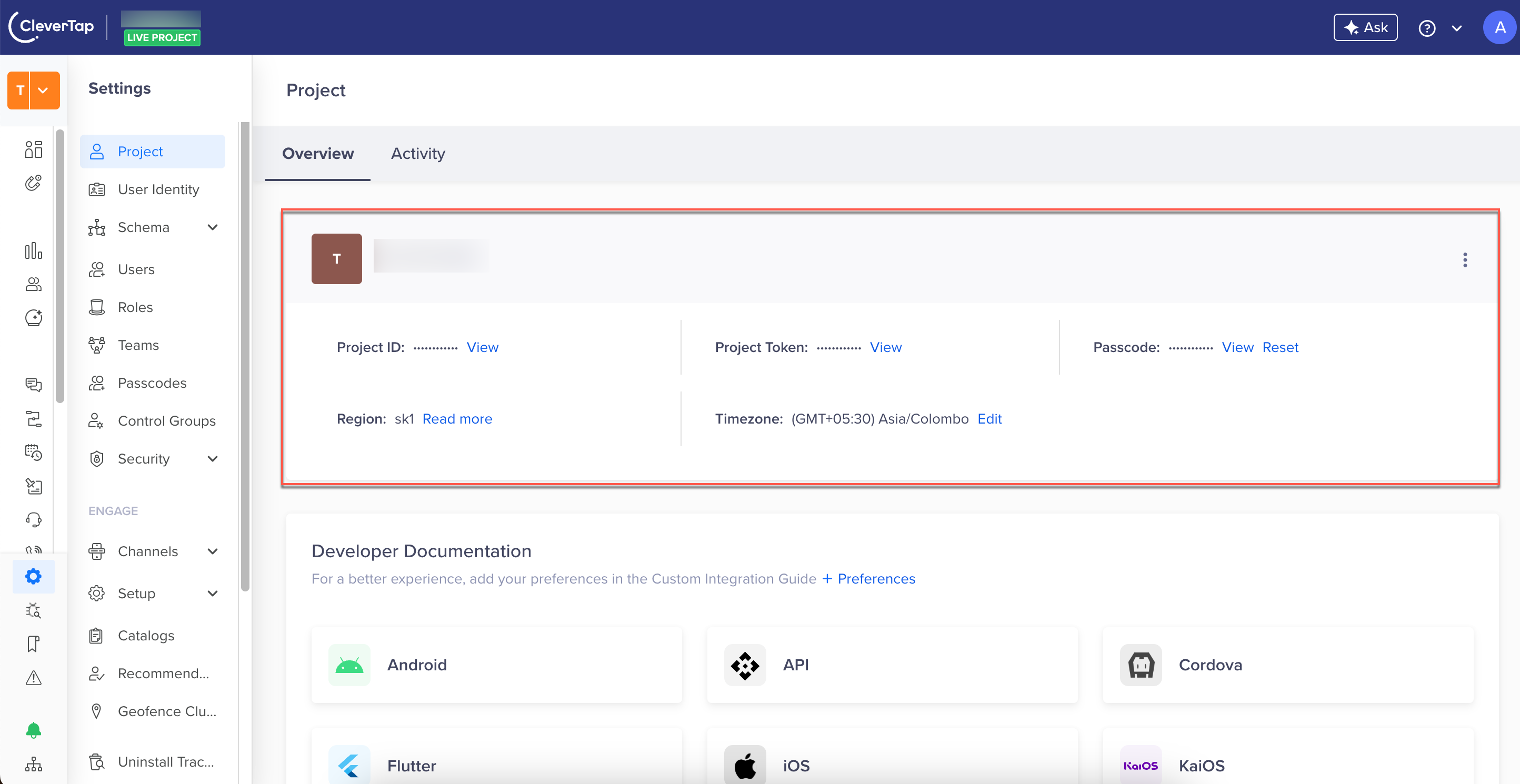
Find CleverTap Account ID and Passcode
You can find the CleverTap Account ID and Passcode from the CleverTap dashboard by navigating to Settings > Project.
Example Response
The following is a sample response. On a successful API call, the response returns detailed information about each coupon's properties, applicability, and validation.
{
    "status": "success",
    "records": [
        {
            "couponTimeframe": [
                {
                    "timeSlot": {
                        "startTime": "00:00AM",
                        "endTime": "11:59PM"
                    },
                    "validationDay": "All"
                }
            ],
            "couponName": "",
            "couponExpiry": 32494151843,
            "couponCodeId": 2255,
            "totalRedemptionUnlimited": true,
            "isApplicable": true,
            "description": "",
            "message": "",
            "couponExpiryNever": true,
            "termsAndConditions": [],
            "discountEffect": {
                "discountRate": 99,
                "rewardType": "cashback",
                "discountType": "entireOrder",
                "discountAppliedOn": "saleAmount",
                "discountValue": "absolute"
            },
            "totalRedemptionLeft": 0,
            "couponSavings": {
                "customPropertyDiscount": null,
                "orderDiscount": 0,
                "shippingDiscount": 0,
                "orderCashbackPoints": 99,
                "order": {
                    "saleAmount": 101,
                    "metadata": {"customerType": "guests"},
                    "saleMrpTotal": 399,
                    "orderId": "order12345",
                    "orderStatus": "pending",
                    "itemsTotalQuantity": 0,
                    "itemsMrpTotal": 1000,
                    "saleChannel": "online",
                    "orderShipping": 0,
                    "locationId": "IND",
                    "location": "BLR",
                    "items": [
                        {
                            "unitPrice": 300,
                            "subCategory": "",
                            "metadata": null,
                            "quantity": 3,
                            "productId": "123456",
                            "itemDiscount": 0,
                            "mrp": 300,
                            "itemCashbackPoints": 89.1,
                            "grossAmount": 900,
                            "isItemValidForDiscount": true,
                            "itemName": "i1",
                            "grossMrp": 900,
                            "sku": "124",
                            "category": "shirts",
                            "itemNetAmount": 810.9,
                            "brand": "levis"
                        }
                    ],
                    "orderNetAmount": 2,
                    "itemsSaleAmount": 1000
                }
            },
            "bestCoupon": "Yes",
            "identity": "j6158301",
            "requestId": "",
            "redemptionActivationDate": 1756405800,
            "userRedemptionUnlimited": false,
            "redemptionStatus": true,
            "couponCode": "SALE100",
            "userRedemptionLeft": 1
        }
    ]
}
Response Fields
The following table describes the top-level coupon response fields.
| Field | Description | Type | Example Value |
|---|---|---|---|
| identity | Unique customer identifier. | string | user123 |
| couponCode | Fixed the coupon code configured in CleverTap. | string | DISCOUNT20 |
| couponCodeId | Unique coupon identifier. | integer | 12345 |
| couponName | Name of the coupon. | string | 20% Off on Electronics |
| description | Description of the coupon. | string | Get 20% off on all electronics. |
| termsAndConditions | Terms and conditions associated with the coupon. | array of strings | ["Valid for electronics only."] |
| couponExpiry | The overall expiration timestamp after which the coupon can no longer be used. | epoch timestamp | 1740829235 |
| couponExpiryNever | Indicates whether the coupon has no expiry date set. | boolean | true |
| totalRedemptionLeft | Total redemptions remaining for this coupon code. When totalRedemptionUnlimited is true, this field returns 0. | integer | 10 |
| totalRedemptionUnlimited | Indicates the total redemption limit per code is set to unlimited. | boolean | true |
| userRedemptionLeft | Remaining redemptions for the user. | numeric | 5 |
| userRedemptionUnlimited | Indicates the total redemption limit per user is set to unlimited. | boolean | false |
| isApplicable | Indicates if the coupon is applicable for this request. | boolean | true |
| redemptionStatus | Indicates whether the coupon redemption is active for the user. | boolean | true |
| redemptionActivationDate | Activation date for coupon redemption, as a Unix epoch timestamp. | timestamp | 1756405800 |
| message | Validation message when isApplicable is false. | string | Coupon expired. |
| bestCoupon | Identifies the coupon offering the highest discount, determined by comparing orderDiscount values across all applicable coupons. | string | Yes or No |
| couponSavings | Object containing derived order properties related to coupon application, such as total savings and item-specific discounts. | object | — |
| requestId | Identifier for the API request associated with this coupon response. | string | "" |
order Response Object Fields
order Response Object FieldsThe following table describes the fields returned inside the order object within couponSavings.
| Field | Description | Type | Example Value |
|---|---|---|---|
| orderNetAmount | Net order amount after applying the discount, that is, saleAmount minus orderDiscount. Negative values are returned as 0. | numeric | 500 |
| orderDiscount | Total discount applied to the order. | numeric | 100 |
| shippingDiscount | Discount applied to shipping charges. | numeric | 50 |
| customPropertyDiscount | Discount applied to a custom property. Returns an object containing the property name and discount value if applicable; otherwise returns null. | object or null | { "property": "orderShipping", "value": 100 } |
| orderCashbackPoints | Total cashback points for the order. | numeric | 20 |
| itemsSaleAmount | Total sale amount of items applicable for the discount. Calculated as unitPrice × quantity of all applicable items. | numeric | 500 |
| itemsMrpTotal | Total MRP amount of items applicable for the discount. Calculated as MRP × quantity of all applicable items. | numeric | 600 |
| itemsTotalQuantity | Total quantity of items applicable for the discount. | numeric | 3 |
items Response Object Fields
items Response Object FieldsThe following table describes the fields returned inside each item in the items array within the order response object.
| Field | Description | Type | Example Value |
|---|---|---|---|
| itemDiscount | Discount applied at the item level, proportionate to the order discount. | numeric | 10 |
| itemNetAmount | Net amount for the item after applying the discount, that is, (unitPrice × quantity) minus itemDiscount. | numeric | 90 |
| itemCashbackPoints | Cashback points applied to the item. | numeric | 5 |
| grossAmount | Gross amount of the item. Calculated as unitPrice × quantity. | numeric | 300 |
| grossMRP | Gross MRP of the item. Calculated as MRP × quantity. | numeric | 400 |
| isItemValidForDiscount | Indicates whether this item qualifies for the coupon discount. | boolean | true |
orderanditemObject Validation
- If the
orderanditemobjects are not provided, the API returnsisApplicableastrue, bypassing all validations.- If the
orderanditemobjects exist but all keys have empty values, the API returnsisApplicableastrue, bypassing all validations.- If the
orderanditemobjects are passed with key values, the API validates coupons based on discount rules and returns coupons with theirisApplicablestatus.
coupon Object Fields
coupon Object FieldsThe following table describes the fields inside the discountEffect object.
| Field | Description | Type | Example Value |
|---|---|---|---|
| discountEffect | Object containing details of the discount applied. | object | — |
| discountValue | Type of discount applied: percentage or absolute. | string | percentage or absolute |
| discountRate | The discount amount. When discountValue is percentage, this is a percentage (for example, 50 means 50% off). When discountValue is absolute, this is a flat monetary value (for example, 99 means a flat 99-unit cashback or discount). | numeric | 50 |
| discountType | Determines how the discount is applied. Possible values: entireOrder (applies to the total cart value), cartExcluding (excludes specific items), specificProducts (applies to specific items only), customProperty (based on custom-defined properties). | string | entireOrder |
| discountAppliedOn | The property on which the discount is applied, for example, saleAmount, itemsSaleAmount, orderShipping, or a custom property key. | string | saleAmount |
| rewardType | The type of reward applied by the coupon. | string | discount or cashback |
couponTimeframe Object
couponTimeframe ObjectThe couponTimeframe object defines the coupon redemption time slots. The API always returns this as an array, even for the default 24/7 case.
- If a Custom schedule is not set, the coupon is valid 24 hours on all days, and the array contains a single entry.
- If a Custom schedule is set, the array contains one entry per selected day.
The following table describes the couponTimeframe fields.
| Field | Description | Type | Example Value |
|---|---|---|---|
| validationDay | The days when the coupon is valid. If the custom schedule is not set, it returns a value indicating that all days are included. If the custom schedule is set, it returns specific day names such as MONDAY, TUESDAY. | string | All or MONDAY |
| timeSlot | Object defining the time slot when the coupon can be used, containing startTime and endTime. | object | — |
| startTime | The start time of the valid time slot in HH:MMAM/PM format (for example, 06:00AM). For default 24/7 coupons, this value is 00:00AM. | string | 06:00AM |
| endTime | The end time of the valid time slot in HH:MMAM/PM format (for example, 08:00PM). For default 24/7 coupons, this value is 11:59PM. | string | 08:00PM |
Sample Value When Custom Schedule is Not Set (Valid 24/7)
"couponTimeframe": [
    {
        "timeSlot": {
            "startTime": "00:00AM",
            "endTime": "11:59PM"
        },
        "validationDay": "All"
    }
]
Sample Value When Custom Schedule is Set (Specific Days and Time Slots)
"couponTimeframe": [
    {
        "validationDay": "MONDAY",
        "timeSlot": {
            "startTime": "06:00PM",
            "endTime": "08:00PM"
        }
    },
    {
        "validationDay": "TUESDAY",
        "timeSlot": {
            "startTime": "06:00PM",
            "endTime": "08:00PM"
        }
    }
]
Understanding API Responses
The API response varies depending on the input payload, metadata, coupon configuration, and user identity. The following table describes the specific scenarios and their expected outcomes.
| Scenario | Behavior |
|---|---|
| Empty Payload | Returns the All Users coupons with isApplicable as true, bypassing any validations set on the coupon. |
| Identity passed (logged-in user), without order or item details | Returns All Users and campaign coupons applicable to the identity, bypassing validations. |
| Identity passed (logged-in user), with order or item details | Returns All Users and campaign coupons for the identity, with validations checked. isApplicable is true or false with applicable error messages. |
| Identity not passed (non-logged-in user), without order and item objects | Returns only All Users coupons with isApplicable as true, excluding those with validations set on user properties. |
| Identity not passed (non-logged-in user), with order and item objects | Returns only All Users coupons with validations checked. isApplicable is true or false with applicable error messages. |
| Case-sensitive values | Case-sensitive values are ignored when validating coupons. For example, a product name APPLE configured in the coupon matches apple passed in the API payload. |
| Code visibility unchecked in configuration | Coupons with unchecked code visibility are not returned in the API response. The user is expected to enter the coupon code manually. |
| Coupon unavailable on specific days | The coupon is returned with isApplicable as false and an error message. |
| Coupon status: Active | All Users coupons are returned with isApplicable as true or false. Rule-based coupons are returned with both isApplicable and redemptionStatus. |
| Coupon status: Scheduled, Expired, Draft, Ended, or Archived | Coupons are not returned. |
| Rule-based coupon assigned multiple times to the same user | Returns each coupon as an independent entry along with activation and expiry dates. |
| Multiple records of the same coupon | Returns each record independently if the configuration status is active and the redemption status is active or inactive. |
| Per-user redemption limit exceeded (rule-based coupon) | Returns the coupon with isApplicable as false. |
| Per-code redemption limit exceeded (rule-based coupon) | Returns the specific coupon code with isApplicable as false. |
| Per-user or per-code redemption limit exceeded (All Users coupon) | Returns the coupon with isApplicable as false. |
| Coupon sorting | Adds a bestCoupon key with value Yes or No, indicating the highest discount based on the orderDiscount value. |
| Metadata key-value matching (Specific Products coupon) | Matches the query key-value with product properties configured in the coupon, for example, category = jeans, shirts. |
| Metadata key-value matching (Entire Order or Custom Property coupon) | Returns all Entire Order and Custom Property coupons, as they do not have product properties. |
| Entire Order coupon with exclude products condition | Returns all Entire Order coupons not matching the query key-value. |
| Coupon with validations on user properties | Returns the coupon only when the identity is passed. The system automatically evaluates user properties for the given identity against coupon conditions without requiring user property values in the API payload. |
Errors
To know about the errors applicable to the Fetch Coupon API, refer to API Error Cases.
Updated 3 months ago