
SCIM User Provisioning using IdP
Learn how to configure SCIM provisioning in CleverTap to automate user access management using an Identity Provider or API-based setup.
Overview
CleverTap supports System for Cross-domain Identity Management (SCIM) to automate user provisioning and lifecycle management. SCIM is an open standard that automates user identity synchronization across applications. With SCIM, your organisation’s Identity Provider (IdP), such as Okta, Azure AD, or OneLogin, can automatically create, update, and deactivate CleverTap users. It also ensures that your user list always mirrors your IdP, keeping roles and access aligned. For example, an enterprise using Okta can automatically grant CleverTap access when employees join and revoke access when they leave, ensuring security and eliminating manual user management.
AnalogySCIM works like an automated access control system. When access is granted, modified, or revoked in your Identity Provider, the same change is applied to CleverTap automatically.
Supported SCIM Configurations
Before generating your SCIM token, choose the configuration that best suits your environment. The following table compares the available SCIM configurations, when to use each, and the corresponding SCIM endpoint.
| Configuration | When to Use | SCIM Endpoint |
|---|---|---|
| API-based | You manage users with scripts or automation | /nx/v2/scim/v2/Users |
| IdP-driven | You use an Identity Provider (Okta, Azure AD, OneLogin) | /nx/v2/scim/v2/idp |
Important
- The SCIM endpoint differs for API and IdP setups.
- Switching configurations invalidates your current token.
- Tokens cannot be reused between configurations.
Generate SCIM Token for IdP-Based Provisioning
To start SCIM provisioning, configure your CleverTap account and generate a SCIM token. Your IdP uses this token to authenticate all SCIM requests sent to CleverTap.
To generate the token, perform the following steps:
- Go to Organization > SCIM Management in the CleverTap dashboard.
- Select the Configuration type and click Generate Endpoint & Token.
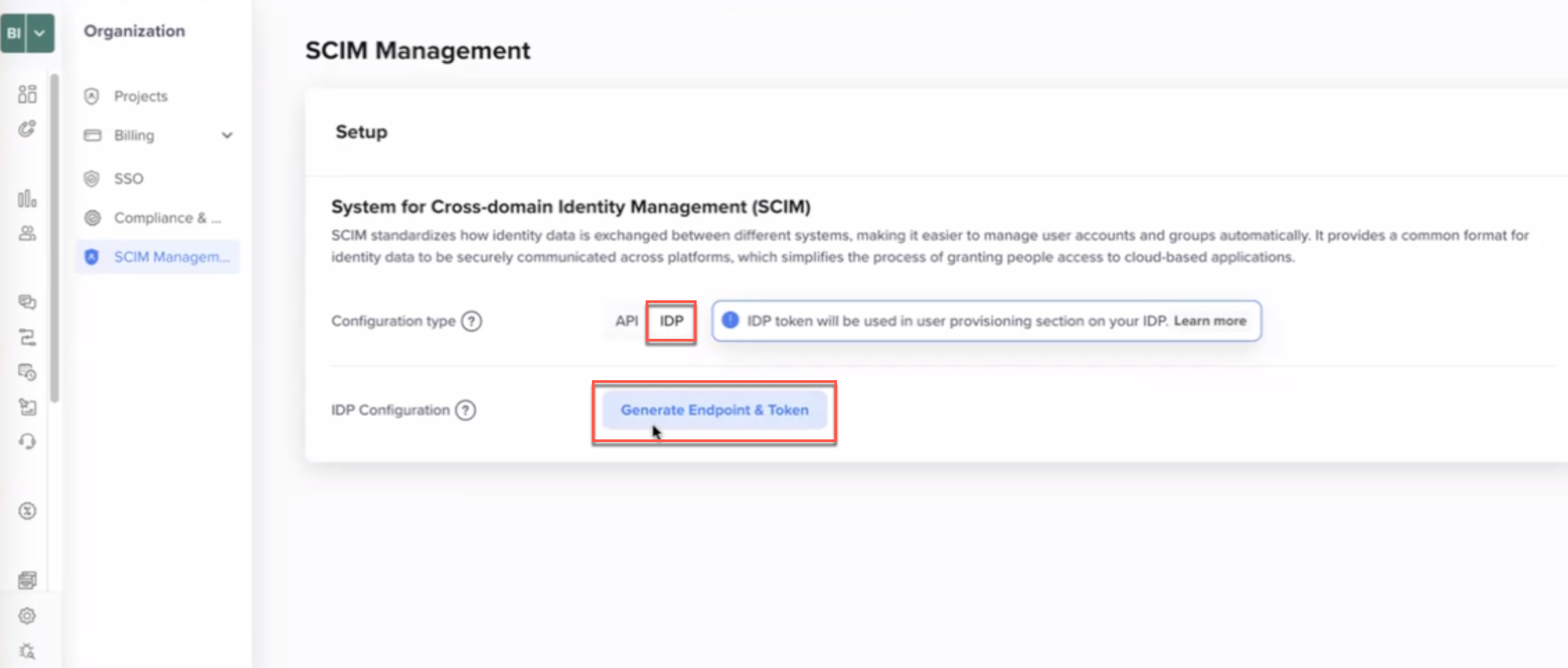
SCIM Management
- Copy the displayed SCIM Token and store it securely.
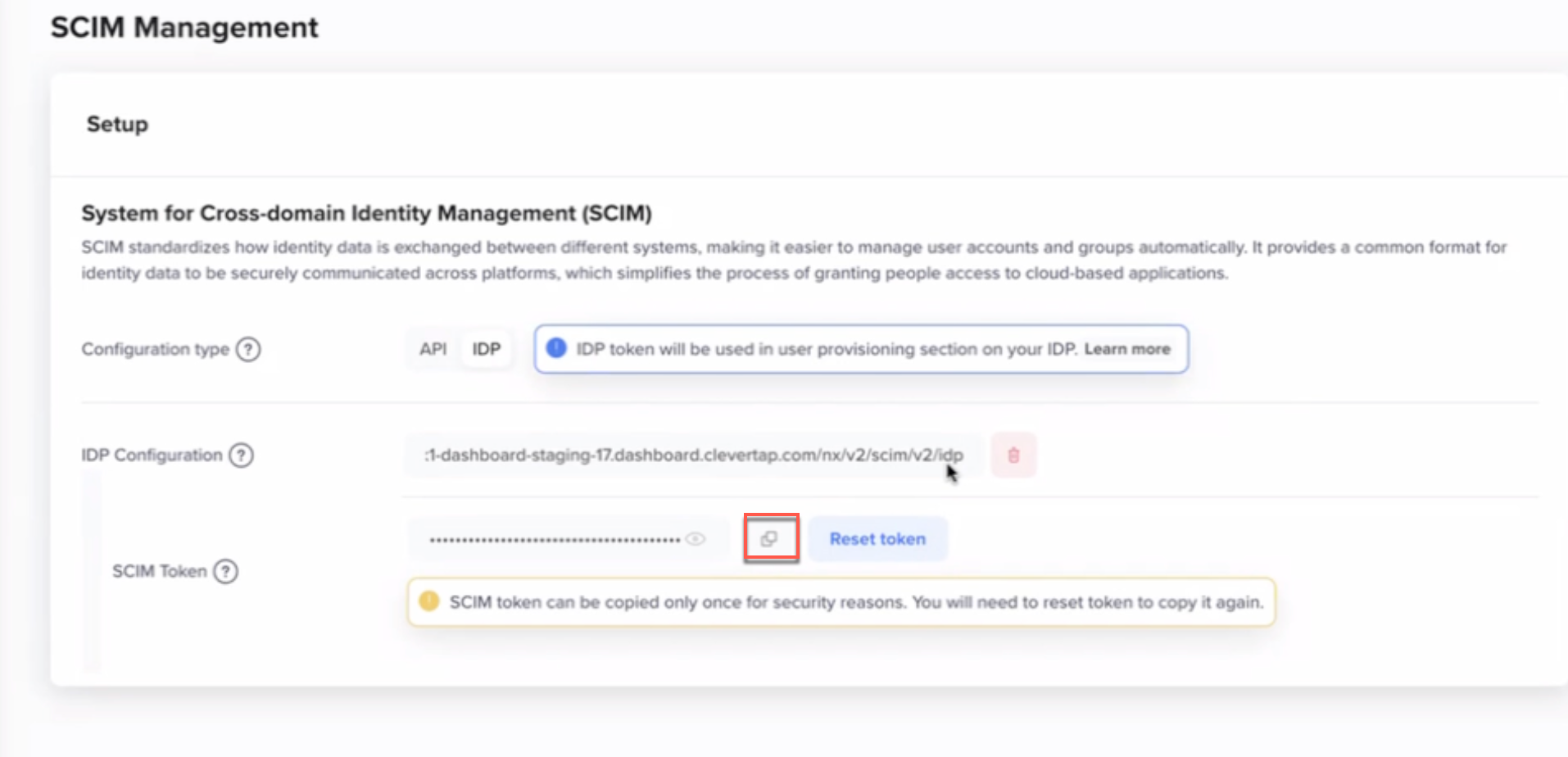
SCIM Token
ImportantThe SCIM token is displayed only once. If you lose the token, you must regenerate it by clicking Reset Token, which will invalidate the existing token.
- Use the generated IDP Configuration endpoint (ending with
/nx/v2/scim/v2/idp) in your SCIM configuration.
Token Handling
After generating your SCIM token, follow these guidelines to manage it securely and prevent authentication issues.
- Each CleverTap account can have only one active SCIM token.
- The token is shown only once after generation.
- If the token is lost, you must regenerate it.
- Regenerating the token invalidates the previous one, so update the token in your IdP immediately.
Important: Switching SCIM Configuration Types
Switching between API and IDP SCIM configurations invalidates the current setup.
- When switching from API to IdP:
- The existing API-based SCIM connection is removed.
- A new SCIM token is generated.
- You must reconfigure SCIM in your Identity Provider using the new token.
- When switching from IdP to API:
- The existing IdP-based SCIM connection is removed.
- The IdP will stop provisioning users.
- Generate and use a new API SCIM token.
Next Steps
After generating your SCIM token, follow one of the setup guides:
Updated 9 months ago