
Reverse/Refund Points
Learn how to use the Reverse/Refund Points API to update the points in loyalty wallets, ensuring accurate application and reversals during transactions.
Overview
The promotions platform credits loyalty points to users when they complete transactions or other qualifying events. Users then redeem those points for eligible purchases.
In cases where an order is returned or canceled, two problems can occur:
- Reward leakage: The user keeps points they earned from a purchase they returned.
- Unfair forfeiture: The user loses points they spent on a purchase that was later canceled.
The Points Refund Management feature solves both these problems. It introduces a Reverse/Refund Points API that your system calls when a return occurs. Using this API, you can:
- Reverse earned points that are still in the promised points bucket.
- Reverse earned points from the active bucket (if the user has sufficient balance).
- Refund points the user redeemed in the returned transaction.
This document explains how the API works and how to integrate it.
Points Buckets
Before you integrate this API, understand the two-point buckets CleverTap uses:
| Bucket | Description |
|---|---|
| Promised points bucket | Points earned from a transaction but not yet redeemable. Points stay here until a configured lock period expires. |
| Active bucket | Points available for the user to redeem. Points move here from the promised points bucket after the lock period. |
Recommended PracticeConfigure your pending lock period to be equal to or longer than your return policy window. If points move to the active bucket before a return is filed, CleverTap can only reverse them if the user has a sufficient active balance.
Prerequisites
Before you use this API, make sure you have the following:
- A CleverTap account with the Promotions feature enabled.
- API credentials (Account ID and Passcode) from your CleverTap dashboard.
- The original wallet transaction ID (
txnId) for the transaction you want to reverse or refund. CleverTap records this ID when points are credited or debited. You must store it on your side at the time of the original transaction. - The user's identity value, which can be their identity string, email address, or phone number.
How API Processing Works?
When CleverTap receives a Reverse/Refund Points API call, it performs the following steps:
-
Validates the
txnId: CleverTap checks that the transaction ID exists in the points ledger against a credit, promised points, or debit transaction type. If the ID is not found, the API returns an error. -
Resolves reward records: CleverTap identifies all credit ledger entries (earned points) and debit ledger entries (redeemed points) linked to the original transaction ID.
-
Checks idempotency: If a reversal or refund has already been fully processed against this transaction ID (that is,
points_balance = 0), the API returns an error to prevent duplicate processing. -
Determines the action based on the following transaction type:
- Promised points bucket: If earned points exist in the promised points bucket and
points_balance > 0, CleverTap posts apoints_reversalledger entry withtype = REVERSE. The scheduled cron job that moves these points to the active bucket is canceled. - Active bucket points: If earned points exist in the active bucket and
points_balance > 0, CleverTap posts apoints_reversalledger entry withtype = REVERSEand reduces the active wallet balance. - Redeemed (debited) points: If the user redeemed points in the original transaction and
points_balance > 0, CleverTap posts arefundledger entry withtype = REFUNDand credits the points back to the user's active wallet.
- Promised points bucket: If earned points exist in the promised points bucket and
-
Updates the ledger balance: CleverTap updates the
points_balancefield in the original ledger record using the following formula:updated_points_balance = current_points_balance - reversed_pointsThe original transaction record is always retained for audit purposes.
-
Calculates the new active balance: After every reversal or refund, the user's active points balance is recalculated as:
Active points = (points_credited + points_refunded) - (points_debited + points_removed + points_expired + points_reversed)
Example Scenario: Full Transaction Reversal and Refund
Consider a scenario where a user earns 120 points from an order, redeems 50 points on the same order, and then returns the order.
In this scenario, call the Reverse/Refund Points API twice, once for the credit transaction and once for the debit transaction.
Step 1. Identify the original wallet transaction IDs (txnId) for the credit and debit entries. Your system should have stored these when the original transaction was processed.
Step 2. Call the Reverse/Refund Points API for the credit transaction:
POST https://in1.api.clevertap.com/1/promo/wallet/adjust?identity=user_01234

{
  "txnId": "wlt_credit_001",
  "description": "CUSTOMER_RETURN"
}
Step 3. Call the Reverse/Refund Points API for the debit transaction:
POST https://in1.api.clevertap.com/1/promo/wallet/adjust?identity=user_01234

{
  "txnId": "wlt_debit_002",
  "description": "CUSTOMER_RETURN"
}
TipYou can handle both the credit reversal and the debit refund by passing the respective
txnIdvalues in separate API calls. CleverTap links each reverse and refund activity back to its parent transaction for full auditability.
Base URL
Here is an example base URL from the account in the India region to reverse or refund points for a user:
POST https://in1.api.clevertap.com/1/promo/wallet/adjustRegion
To identify the API endpoint for your account region, refer to Region.
HTTP Method
POST
Headers
For more information about the API headers used while processing API requests, refer to Headers.
Sample Request
The following is an example request to the Reverse/Refund Points API, including the required headers for authentication:
curl -X POST "https://in1.api.clevertap.com/1/promo/wallet/adjust?identity=user_01234" \
  -H "X-CleverTap-Account-Id: YOUR_ACCOUNT_ID" \
  -H "X-CleverTap-Passcode: YOUR_PASSCODE" \
  -H "Content-Type: application/json" \
Find CleverTap Account ID and Passcode
You can find the CleverTap Account ID and Passcode from the CleverTap dashboard by navigating to the Settings > Project page on the CleverTap dashboard.
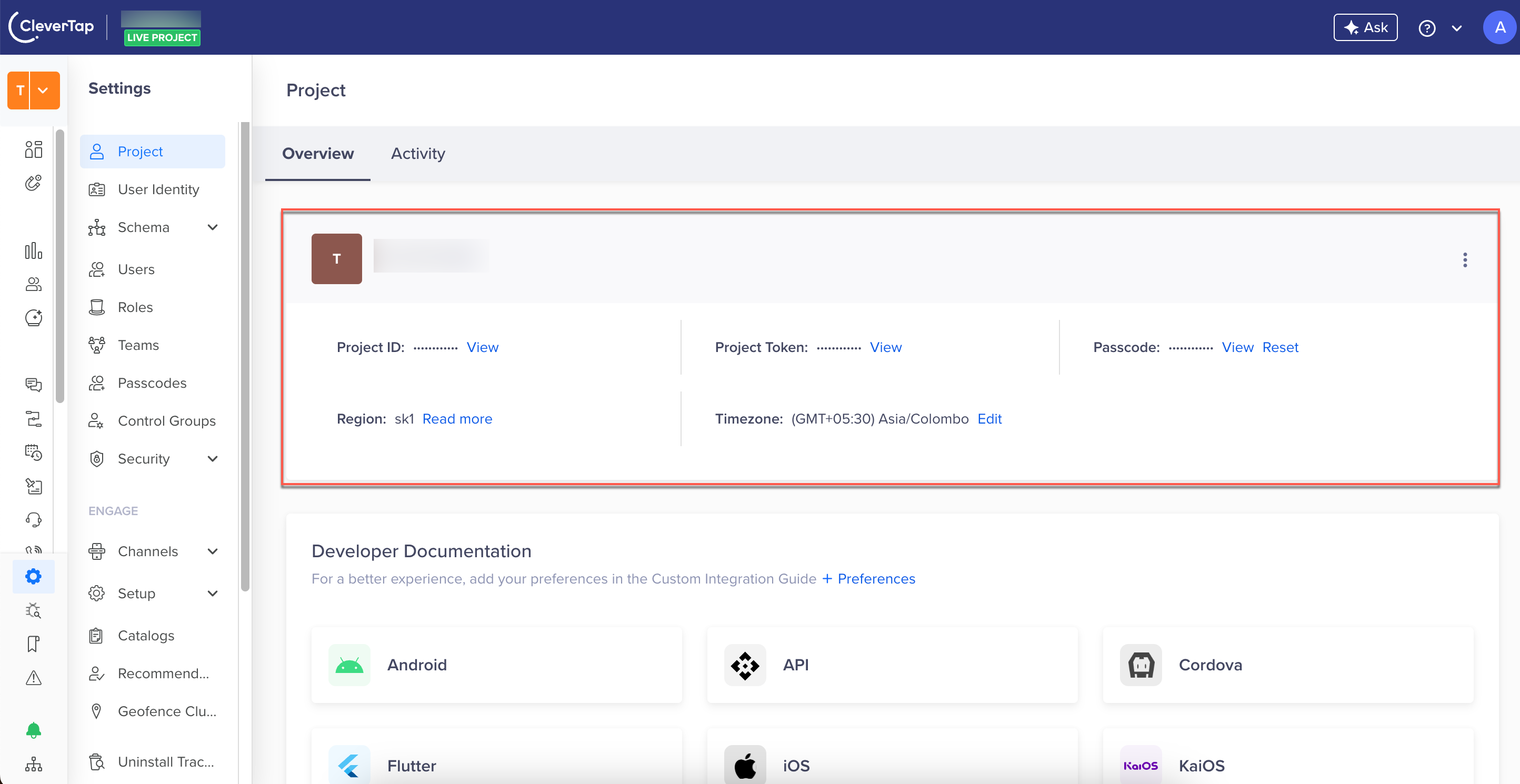
Find CleverTap Project Details
Query Parameters
| Parameter | Description | Type | Required |
|---|---|---|---|
identity | The user's identity value. Accepts an identity string, email address, or phone number. | string | Required |
Body Parameters
| Field | Description | Type | Required |
|---|---|---|---|
txnId | The original wallet transaction ID against which the reversal or refund action is to be taken. | string | Required |
points | The number of points to reverse or refund. If you do not pass this field, CleverTap reverses or refunds all available points against the original transaction. Decimal values are accepted and processed according to global wallet rounding rules. | number | Optional |
description | A label for the return activity. Recorded in the ledger for audit purposes. | string | Optional |
metadata | A key-value object for passing any additional information, such as store ID or return reason. | object | Optional |
Sample Request Payload
The following is the request payload for Reverse/Refund Points:
{
    "txnId": "YOUR_ORIGINAL_WALLET_TXN_ID",
    "points": 50,
    "description": "CUSTOMER_RETURN",
    "metadata": {
      "store_id": "store_099",
      "reason": "damaged_item"
    }
  }'
Sample Response Payload
The following are the sample response payloads for a points reversal and refund request:
{
  "status": "success",
  "records": [
    {
      "type": "reverse",
      "pointsAdjusted": 100,
      "availablePoints": 120,
      "pointsBalance": 20,
      "originalPoints": 120,
      "txnId": "led_001",
      "parentTxnId": "wlt24",
      "saleChannel": "POS",
      "orderId": "1234",
      "locationId": "abc",
      "saleAmount": 1200,
      "metadata": {
        "Key1": "value1",
        "key2": "value2"
      }
    }
  ]
}
{
"status": "success",
"records": [
{
"type": "refund",
"pointsAdjusted": 100,
"availablePoints": 120,
"pointsBalance": 20,
"originalPoints": 120,
"txnId": "led_001",
"parentTxnId": "wlt24",
"saleChannel": "POS",
"orderId": "1234",
"locationId": "abc",
"saleAmount": 1200,
"metadata": {
"Key1": "value1",
"key2": "value2"
}
}
]
}Response Fields
The table below provides a detailed breakdown of the response payload for the Points Reverse/Refund API:
| Field | Description | Type |
|---|---|---|
type | The type of action CleverTap performed. reverse means points were reverted from a credit or promised points bucket. refund means points were credited back to the active wallet from a debit record. | string |
pointsAdjusted | The number of points reversed or refunded by CleverTap. | number |
availablePoints | The points balance available in the credit, promised points, or debit record before the reverse or refund activity was performed. | number |
pointsBalance | The number of points available against the credit, debit, or promised points ledger after the reversal or refund activity. | number |
originalPoints | The original credit, debit, or promised points ledger points value. | number |
txnId | The new transaction ID generated for this reverse or refund activity. | string |
parentTxnId | The original credit or debit transaction ID linked to the reverse or refund activity performed. | string |
orderId | The orderId value retained from the original credit or debit transaction. | string |
saleChannel | The saleChannel value retained from the original credit or debit transaction. | string |
locationId | The locationId value retained from the original credit or debit transaction. | string |
saleAmount | The saleAmount value retained from the original credit or debit transaction. | number |
metadata | The metadata object passed in the request payload. | object |
How to Find a Wallet Transaction ID
You need the original wallet transaction ID (txnId) to call this API. Use one of the following methods to locate it:
- Method 1 — GET Wallet Transaction API: Use the GET wallet transaction API with or without filters to find the right wallet transaction ID.
- Method 2 — CleverTap Dashboard: Search for the points transaction directly in the CleverTap dashboard.
- Method 3 — Points Transaction Report: Use the CleverTap points transaction report to identify the correct transaction.
Supported API Scenarios
The following table outlines the scenarios this API supports:
| Scenario | Action | Outcome |
|---|---|---|
| Points reversal from promised points bucket | Promised points reversal with type = REVERSE | The promised points ledger entry is reversed. The cron job that moves points to the active bucket is canceled. A reverse activity is created and linked to the parent credit transaction ID via parentTxnId. |
| Full points reversal from credit ledger | Full credit points reversal with type = REVERSE | Credited points are fully reversed. The active points balance is updated. The points_balance against this credit record is updated to 0. A reverse activity is created and linked to the parent credit transaction ID via parentTxnId. |
| Partial points reversal from credit ledger | Partial credit points reversal with type = REVERSE | Credited points are reversed with the passed points value. The active points balance is updated. The points_balance against this credit record is updated as current_points_balance - points_reversed. A reverse activity is created and linked to the parent credit transaction ID via parentTxnId. |
| Full points refund from debit ledger | Full debit points refund with type = REFUND | Debited points are refunded back to the parent credit ledger. The active points balance is updated. The points_balance against this debit record is updated to 0. A refund activity is created and linked to the parent debit transaction ID via parentTxnId. |
| Partial points refund from debit ledger | Partial debit points refund with type = REFUND | Debited points are refunded with the passed points value. The active points balance is updated. The points_balance against this debit record is updated as current_points_balance - points_refunded. A refund activity is created and linked to the parent debit transaction ID via parentTxnId. |
Reversal or refund when current points_balance against a credit, debit, or promised points ledger record is 0 | No action | The API does not support reversal or refund for a 0 points balance. An error is returned. |
Common Impact for All Scenarios
The following applies to every reverse and refund activity:
- Every reverse activity is linked to its parent credit or reverse transaction ID via the
parentTxnIdfield. - Every refund activity is linked to its parent debit transaction ID via the
parentTxnIdfield.
API Behavior
The following table describes how the API handles specific cases:
| Case | API Behavior |
|---|---|
Invalid txnId passed | Returns the Invalid txnId error. |
points field not passed in request | Reverses or refunds all available points against the original transaction. |
points field passed (partial reversal) | Reverses or refunds only the specified number of points. |
points value has a decimal (for example, 100.250) | Accepted and processed in accordance with global wallet rounding rules. |
points passed exceeds redeemed, active, or promised points | Returns the Requested points exceed available balance error. |
User has zero points_balance in the credit, debit, or promised points ledger record | Returns the No active points available for adjustment error. |
| Partial reverse or refund (for example, 50 of 100 available points) | The API accepts the request and processes only the requested number of points. |
| Multiple partial reverse or refund requests against the same transaction | The API accepts each request as long as points_balance > 0. Each request creates an individual reverse or refund activity linked to the original ledger record. |
Error Response
CleverTap returns HTTP 200 for all business logic errors with "status": "fail" and a custom error code of 777 in the response body.
The following is a sample error response:
{
  "status": "fail",
  "error": "No active points available for adjustment.",
  "code": 777
}
The following table lists the error cases and their corresponding messages:
| Case | Error Message | Error Code |
|---|---|---|
Invalid txnId passed | Invalid txnId | 777 |
points passed exceeds balance in credit, debit, or promised points record | Requested points exceed available balance | 777 |
Zero points_balance in credit, debit, or promised points ledger record | No active points available for adjustment | 777 |
| Wrong data type passed for a field | bind "description" from body: json: cannot unmarshal number into Go struct field AdjustTransactionRequest.description of type string | 777 |
Best Practices
Follow these best practices to get the most out of the Points Refund Management feature:
- Store wallet transaction IDs at the time of the original transaction. The API requires the original
txnIdto process any reversal or refund. If you do not store this value, you cannot call the API. - Set your pending lock period to match your return policy window. If your return window is 30 days, configure the pending period to be at least 30 days. This ensures that earned points remain in the promised points bucket when a return is filed.
- Use the
descriptionfield for auditing. Pass a meaningful value such asCUSTOMER_RETURNor a reason code. This value is stored in the ledger and appears in transaction reports. - Use the
metadatafield for additional context. Pass store IDs, agent IDs, or return reference numbers to improve traceability. - Handle idempotency on your side. Before calling the API, verify that you have not already submitted a reversal or refund for the same
txnId. The API returns an error ifpoints_balancefor that transaction is already0. - Do not rely on this API to handle negative balances. The API does not allow wallets to go below zero. Design your return workflows accordingly.
FAQs
Can I reverse only part of the points from a transaction?
Yes. Pass the points field in the request payload with the specific number of points you want to reverse or refund. The API processes only the points you specify and leaves the remaining balance available for future adjustments.
Can I call the API multiple times against the same transaction?
Yes. As long as points_balance > 0 for the original transaction, the API accepts multiple partial reversal or refund requests. Each request creates a separate reverse or refund ledger entry linked to the original transaction.
What happens to the original transaction record in the ledger?
The original transaction record is always retained. CleverTap creates new reverse or refund entries linked to the parent record. The points_balance field in the original record is updated to reflect the remaining balance.
Does this API affect the user's loyalty tier?
Currently, tier re-evaluation triggered by a return is out of scope. However, if your tier criteria are based on points collected, the points collected value in the tier table is updated when points are reversed from the credit bucket.
Is this API available for coupon or voucher reversals?
No. Currently, the API supports wallet points only.
What region should I use for the API endpoint?
The example endpoint uses in1.api.clevertap.com. Replace in1 with the region identifier for your CleverTap account. For more information, refer to Region.
Updated about 1 month ago